Three-circuit distortion · Version 1.0

CINDER

Three waveshaping circuits, a saturation stage that puts even and odd harmonics on their own knobs, an LFO that makes the drive breathe, and a transfer curve drawn by the same code that processes your audio.

AUTO LEVEL holds the loudness still while you drive it, so turning the knob changes the tone and not the volume, and nothing leaves above −0.3 dB true peak. 44 samples of latency, at every sample rate.

VST3AUAAXmacOS · Apple Silicon and IntelWindows · coming soon
TRANSFER · LFO ON DRIVE
DRIVE -THD -CIRCUIT EMBER
DRAG THE CURVE SIDEWAYS TO SET DRIVE
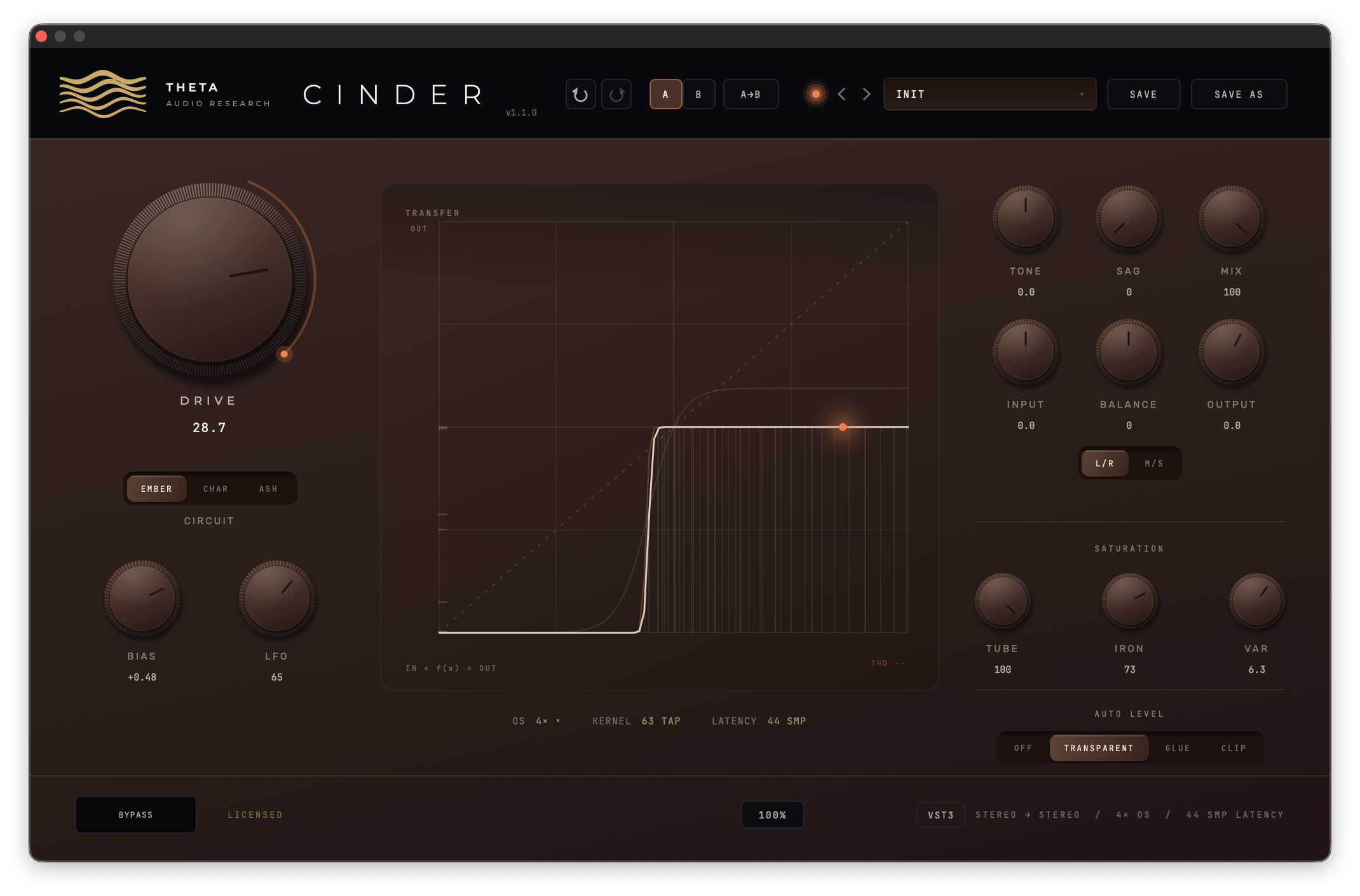
The CINDER v1.1.0 panel: DRIVE 28.7 on EMBER with BIAS and LFO under it, the transfer display in the middle, TONE, SAG, MIX, INPUT, BALANCE and OUTPUT with the L/R and M/S switch, the SATURATION row and AUTO LEVEL set to TRANSPARENT
Before and after
Sound on
How it works

A distortion is a curve. The input level goes in along the bottom, the output comes out up the side, and as long as the curve is a straight diagonal nothing happens. Bend it and every waveform passing through is bent with it: the peaks round off, the two halves stop matching, and new frequencies appear at whole multiples of the note you played. Those are the harmonics, and they are the sound of distortion.

Even harmonics read as thickness. Odd harmonics read as edge. A curve that treats the top and bottom halves the same makes odd ones. A curve that treats them differently adds the even ones.

Everything in CINDER decides the shape of that curve or what happens after it. DRIVE pushes the signal into the bend. CIRCUIT picks the bend. BIAS slides the signal off centre. TUBE and IRON reshape the harmonics, VAR lets the two channels disagree, SAG and the LFO move the drive on their own. TONE, MIX and OUTPUT follow, and AUTO LEVEL takes the volume out of the comparison.

One header owns the curve. The audio path, the display and the test harness all evaluate it, so the picture cannot drift from the sound.

IN UP 4×63 TAP SHAPER · ADAAEMBER · CHAR · ASH+ TUBE · IRON · VAR DOWN 4×35 TAP DC10 Hz TONETILT 800 Hz MIX DRY · DELAYED 12 SAMPLES TO MATCH OUTTRIM AUTO LEVEL−0.3 dBTP OUT SAG LFO MOVE DRIVE (OR BIAS) EVERY 32 SAMPLES
  1. 1LIFT

    The signal is upsampled four times, so the harmonics the curve makes have room above the audio band.

  2. 2BEND

    The shaper bends it, with antiderivative anti-aliasing around the nonlinearity. TUBE and IRON reshape the curve, VAR detunes the right channel.

  3. 3RETURN

    The downsampler brings it back to your session's rate, and a 10 Hz blocker takes out the DC an asymmetric curve leaves.

  4. 4VOICE

    TONE tilts the result around 800 Hz. MIX blends it with the dry signal, delayed so the two stay in phase.

  5. 5LEVEL

    OUTPUT trims, then AUTO LEVEL matches the loudness to the input and holds the ceiling at −0.3 dB true peak.

The curve lab

This is CINDER's shaper running in your browser. On the left is the transfer display as the plug-in draws it. On the right a 0.72 sine, the level the ember dot marks, goes through that curve: the faint trace is what went in, the cream one is what came out, and the bars underneath are the harmonics it gained, the second up to the seventh, in decibels below the fundamental.

THD-H2-H3-PEAK IN 0.72 → OUT-
OUTPUT · LEFTRIGHT, WHEN VAR IS UPINPUTMEMORYLESS MODEL · BEFORE TONE, MIX AND AUTO LEVEL
The three circuits

Each picture is a sine going through one circuit while its DRIVE climbs from 3 to 21 dB and back. The faint line is what goes in, the bright one what comes out. Every circuit normalises its own output, so more drive brings more harmonics and more compression, not just more level.

EMBERSYMMETRIC · TANH

A symmetric soft clipper: a hyperbolic tangent, so both halves of the waveform round off the same way. Mostly odd harmonics, with the second sitting 126 dB down. It compresses peaks and thickens without changing the character of the source. The neutral, always-works setting: warmth and glue rather than dirt.

CHARASYMMETRIC · 0.7 / 1.4

The same soft clipping, asymmetric: the negative half is squashed twice as hard as the positive half, the way a triode stage clips. That mismatch puts real second harmonic into the signal, 26 dB below the fundamental where EMBER's is 126 dB down: a hundred decibels of difference from one button. Thicker and more forward, with an amp-like bite.

ASHWAVEFOLDER · SINE

A wavefolder. Instead of flattening as the signal gets loud, the curve turns back on itself and folds, so more DRIVE makes the tone stranger rather than just dirtier: buzzy and full of upper harmonics. Past the first fold it stops sounding like clipping and starts sounding like a new instrument. It is the setting that will not behave, and it is on the panel for that reason.

The controls

Press SHOW IN THE LAB on a card and the curve lab above sweeps that control through its range. Every control automates. Drag a knob up and down or side to side, hold Shift for fine moves, double-click it to return it to its default, or double-click its number to type a value.

DRIVE

0 to 36 dB, default 12. How hard the signal is pushed into the circuit. Low values sit in the straight part of the curve, high values push into the bend. Because the circuits normalise their own output, turning DRIVE up adds harmonics and compression rather than simply getting louder.

BIAS

−1.00 to +1.00. Slides the signal off centre before it reaches the curve, so even a symmetric circuit clips asymmetrically. At BIAS 0.4, EMBER's second harmonic rises from −126 dB to −20.9 dB. Positive and negative lean opposite ways, and the DC it creates is removed afterwards, so your meters stay on zero.

TUBE · IRON

The SATURATION row. TUBE adds a squared term over the circuit's curve, and squaring makes even harmonics: H2 climbs from −126 dB to −25 dB between 0 and 60. IRON adds a cubed term, the odd series. At high DRIVE its third harmonic partly opposes the circuit's own, so it rebalances the series rather than piling on. At some settings IRON sounds cleaner. That is the design.

VAR

0 to 10. Real hardware never has two identical channels. VAR mismatches the right one on purpose: at the top it runs 2.5 dB more drive, a slightly different bias and a little more TUBE and IRON, and the display draws it as a second, ember curve. At VAR 0 the channels match to −345 dB. On a mono track it has nothing to act on.

SAG

0 to 100. A level follower pulls the drive down as the signal gets loud, up to 9 dB at 100, reacting in about 20 ms and recovering over about 250 ms. It ducks on the transient and breathes back in behind it: sustained material distorts less than the hit that started it. At SAG 100 the third harmonic falls from −11.7 dB to −17.9 dB.

TONE · MIX · OUTPUT

TONE is a ±12 dB tilt around 800 Hz: at +12 it measures −6.00 dB at 100 Hz and +6.00 dB at 8 kHz. MIX is a parallel blend against a delay-matched dry leg, linear, and transparent to −288 dB at zero. OUTPUT trims −18 to +12 dB, within 1% of its marking.

The CINDER v1.1.0 EQ options open: an eight-node curve set POST DRIVE, with band 6 a bell at 4.08 kHz, +12.8 dB, Q 1.60, and the AMOUNT, RESET and FLAT controls
EQ OPTIONS OPEN · POST DRIVE
The LFO

The LFO knob sits beside BIAS, and it is the depth. At 100 it swings DRIVE 12 dB either side of wherever DRIVE is set, or BIAS a full 1.00 either side, and the swing never takes either past its own range. At 0 it is off, and CINDER sounds exactly as it did before the LFO existed: sessions and presets from earlier versions open there.

Right-click the knob, or click the word LFO under it, and its options open over the panel. RATE runs 0.05 to 20 Hz. SYNC locks the sweep to your host's tempo and, while the transport runs, to the bar line, with DIVISION from 4 bars down to 1/32, triplets included. SHAPE is SINE, TRI, SQR or S&H, and TARGET is DRIVE or BIAS.

On DRIVE it pulses the amount of distortion; on BIAS it rocks the even-harmonic lean back and forth and changes the colour more than the amount. SQR flips between two settings and S&H jumps to a new one each cycle, and every edge goes through a 3 ms smoother so a jump never clicks.

Free-running, the sweep starts from the same point every time the host starts the plug-in, and S&H draws from a fixed seed, so the same passage renders the same samples. Everything in the panel automates and saves with your session and your presets.

TARGET
The CINDER v1.1.0 panel with the LFO options open: SOURCE LFO or ENVELOPE, TARGET BIAS, RATE 9.36 Hz, SYNC and DIVISION, SHAPE SQR, and the ENVELOPE FOLLOWER ATTACK and RELEASE controls
The display

Most distortion plug-ins show you a curve. Very few show you their curve: the picture is usually drawn by separate code from a simplified model, so it drifts exactly where you care most, at the extremes and once a second stage is involved. CINDER's display evaluates the same header as the audio, so the curve bends because the shaper bent.

The THD line in the corner goes a step further. It is not predicted from the curve at all. CINDER finds the fundamental in your input and reads every harmonic of it in the audio leaving the plug-in, after TONE, MIX, OUTPUT and AUTO LEVEL: THD 23.0 % @ 1.00 kHz. Feed it a chord or noise and it reads THD -- rather than print a number that means nothing. The build refuses to ship if that reading disagrees with an independent analysis of the same audio by more than half a decibel.

  • The dashed diagonal is unity. Wherever the curve pulls away from it, CINDER is changing the signal.
  • The cream curve is the transfer at your settings. Flat shoulders are compression; on ASH, the places it turns back are the folds.
  • Two ghost curves show the same circuit at half your drive and at one and a half times plus 3 dB, so you see which way the shape is heading before you turn anything.
  • 56 filaments rise from the axis to meet the curve, densest near the middle where most audio lives. Their heights are echoed as ticks on the left edge: where the ticks crowd, levels are being squeezed together.
  • The ember dot is a strong input, 0.72 of full scale, meeting the curve: the "you are here" for a loud passage.

The curves follow DRIVE, CIRCUIT, BIAS, TUBE, IRON and VAR, and stay still otherwise; the display repaints only when one of them moves. TONE, SAG, MIX, OUTPUT and AUTO LEVEL act after the curve. Only the THD line follows the audio.

Auto level

Turn up a distortion and it gets louder. Louder sounds better, reliably, to everyone, for about a second, so every comparison you make while dialling one in is rigged. AUTO LEVEL holds the output where your input was, so moving DRIVE changes the tone and leaves the volume alone. Twelve decibels of DRIVE move the output by 0.08 dB with it working, where the same move is 9.56 dB with it off.

One switch, four positions, no knobs to set. TRANSPARENT rides the gain slowly enough that you cannot hear it move, and lets an anti-aliased clipper take the fast peaks. GLUE adds a 2.5:1 soft-knee compressor, the way a bus compressor sits on a mix. CLIP drives 9 dB into that clipper on purpose: loud, without the fizz a plain clipper folds back down the spectrum. TRANSPARENT and GLUE land within 0.1 dB of each other, so switching between them is a character decision.

A short true-peak limiter sits behind every working mode, so the ceiling holds between the samples too, where a converter or an encoder will find it: driven sines up to 15 kHz and hard transients, measured 16× oversampled, never reach 0 dBTP. OFF never limits, and it is the default. Mode changes fade over 10 ms, and BYPASS takes AUTO LEVEL out with everything else.

LEVEL MOVES 0.08 dB
ILLUSTRATION · THE 9.56 dB AND 0.08 dB FIGURES ARE MEASURED IN THE RELEASE HARNESS
The licence

CINDER runs as a fully working trial for fourteen days from the first time it loads, and the line at the bottom of the window counts down the days left. When the trial ends without activation, CINDER goes silent until you activate it. A licence unlocks the same install in place, no reinstall.

Sandboxed hosts such as GarageBand keep their own copy of your Library, so activate CINDER in Logic Pro, Live, Pro Tools or another standard host.

Click the licence line, paste the key from your purchase email and press ACTIVATE. Activation needs an internet connection once; after that CINDER works offline. One licence covers three computers, and DEACTIVATE THIS COMPUTER frees a seat so you can move it without writing to us.

An activated copy is never silenced by a licence problem. After a hardware change, or with the activation server out of reach, it keeps making sound and asks you to reactivate.

Who it is for
MIX ENGINEERS

RUST BUS is parallel warmth for a whole mix or a drum bus. AUTO LEVEL means pushing DRIVE never wins an A/B on volume alone, and TRANSPARENT holds the ceiling without being heard.

GUITAR, BASS & VOCALS

CHAR's asymmetry and a touch of BIAS give an amp-like bite without an amp sim. TUBE adds body without bite, IRON the reverse. EMBER LEAD is the place to start.

DRUMS

SAG ducks the drive on the hit and lets it breathe back in behind, so the tail opens out. MIX keeps the transient while the crunch sits under it.

SOUND DESIGN

ASH folds instead of flattening; sweep DRIVE and every change of shape is a new timbre. Put the LFO on it, add VAR for width, and expect OUTPUT well below zero.

Technical specifications
TYPEThree-circuit distortion (insert)
CIRCUITSEMBER (symmetric soft clip) · CHAR (asymmetric soft clip) · ASH (wavefolder)
CONTROLSDRIVE · BIAS · LFO · TONE · SAG · MIX · OUTPUT · TUBE · IRON · VAR · AUTO LEVEL · BYPASS
LFODepth 0–100 % on DRIVE (±12 dB) or BIAS (±1.00) · RATE 0.05–20 Hz or tempo SYNC, 4 BAR to 1/32 with triplets · SINE, TRI, SQR, S&H
PROCESSING4× oversampling, 63-tap up / 35-tap down, first-order ADAA around the nonlinearity
OUTPUTAUTO LEVEL: OFF · TRANSPARENT · GLUE · CLIP, −0.3 dBTP ceiling
LATENCY44 samples at every rate and in every mode, reported to the host
CHANNELSMono, mono to stereo, stereo
PRESETSFour factory sounds (INIT, RUST BUS, EMBER LEAD, ASH FOLD) in the host's own preset menu; your own presets with save and save as
LICENCE14-day full trial · one licence, three computers · activate once online, then runs offline
FORMATSVST3 · Audio Unit · AAX (Pro Tools)
SYSTEMmacOS 11 or later · Apple Silicon and Intel (universal) · Developer ID signed, notarized
Windows (VST3): coming soon

CINDER shares its AUTO LEVEL output stage with the rest of the Alchemy Index, so level-matched A/Bs work the same way across THETA's plug-ins.

No amp sim, no cabinet, no convolution. A single-purpose distortion and the small set of utility controls that make one usable on a bus.

Deployment status
CINDER · 1.0

CINDER 1.0 is calibrated and available for immediate deployment. Three circuits, the LFO, the full panel, nothing withheld.

$50$25

Launch sale. Use code ALCHEMY50 at checkout. The trial is the same installer, unlicensed for fourteen days; a licence unlocks it in place, no reinstall.

MACOS APPLE SILICON AND INTEL · VST3 / AU / AAX INCLUDED · WINDOWS COMING SOON