Deep through-zero flanger · Version 1.0.0

MOIRÉ

Two combs sliding through each other. MOIRÉ is a real through-zero flanger: the wet delay sweeps past the dry signal instead of stopping short of it, so twice every cycle the two land on top of each other and the sound drops through a hole in itself.

Crossing zero costs latency, and MOIRÉ tells you exactly how much, on its face and to your DAW. Switch THRU-ZERO off and the dry path runs live at zero latency. The display in the middle is computed from the same numbers as the sound, and it moves only when there is sound.

VST3AUAAXmacOS · Apple Silicon and IntelStereo
MOIRÉ FIELD · INIT
NOTCH -SWEEP -ORDERS -
CLICK THE DISPLAY TO CHANGE MODE
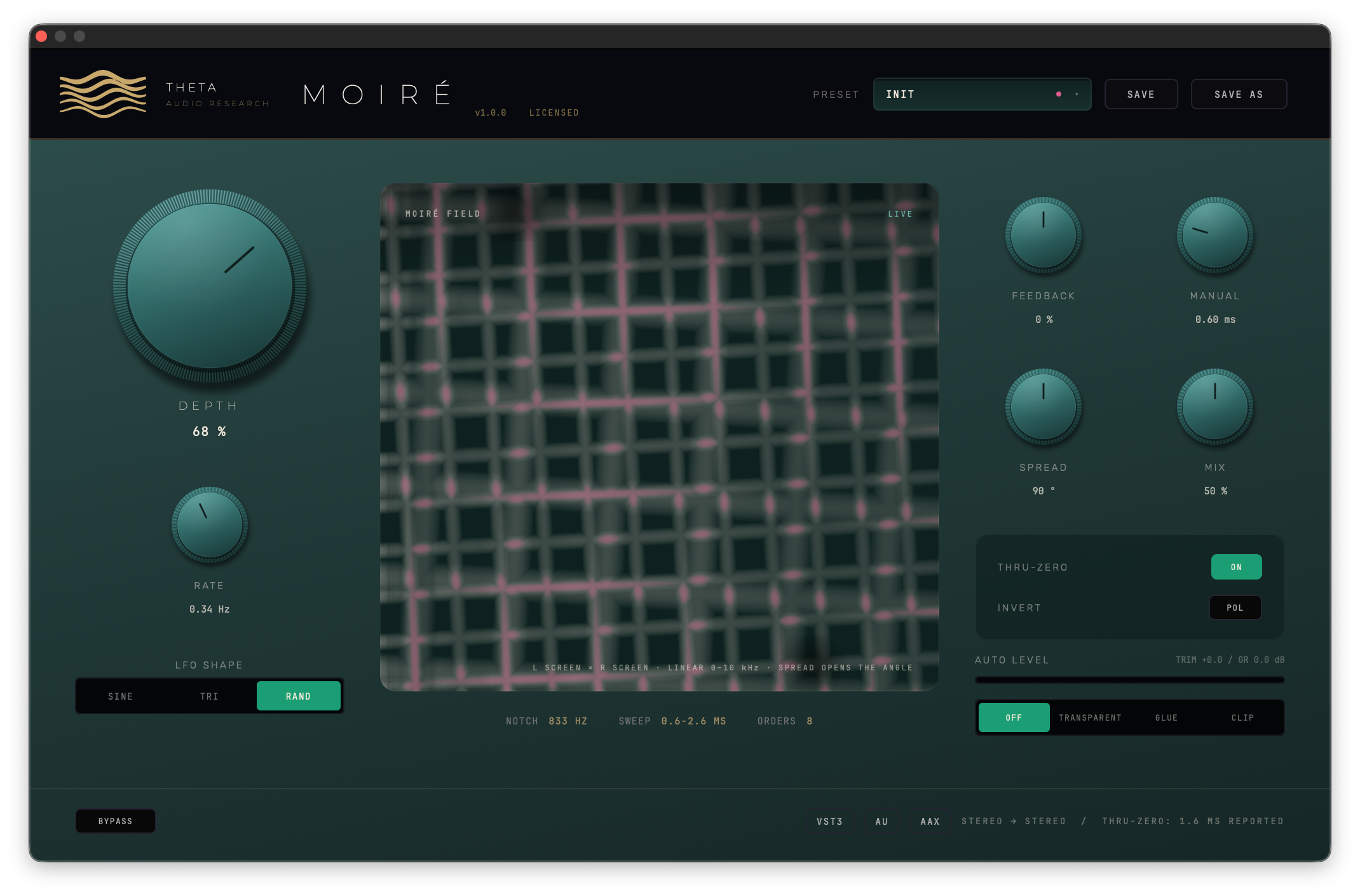
The MOIRÉ panel at INIT: DEPTH, RATE and LFO SHAPE on the left, the comb surface in the middle with NOTCH 833 Hz, SWEEP 0.6-2.6 ms and ORDERS 8 under it, FEEDBACK, MANUAL, SPREAD and MIX on the right above the THRU-ZERO and INVERT switches and the AUTO LEVEL selector, and THRU-ZERO: 1.6 MS REPORTED in the footer
How it works

A flanger adds a signal to a slightly late copy of itself. Wherever the delay is half a cycle, the two cancel; wherever it is a whole cycle, they add. The result is a comb: a row of notches spaced evenly up the spectrum, 1 / delay apart. Sweep the delay and the whole comb slides, which is the jet-plane sound.

An ordinary flanger keeps the dry signal where it is, so the delay can get short but never reach zero, and the comb never quite closes. A through-zero flanger delays the dry signal too, to the middle of the sweep, so the wet tap passes it, crosses it and comes back.

Everything on MOIRÉ's face sets that delay or what happens around it. MANUAL is where the sweep starts. DEPTH is how far it travels. RATE and SHAPE are how it travels. SPREAD runs the right channel's sweep ahead of the left. FEEDBACK sends the delayed signal round again, sharpening the comb. INVERT flips the wet polarity, swapping peaks for notches. MIX sets how much of each you hear.

One constant sets the sweep span, 2.9 ms at full depth, and the processor and the display both read it, so the picture cannot drift from the sound.

IN + WET DELAYMANUAL + DEPTH · 2.9 ms · LFO INVERT± WET FEEDBACK ±95 % DRY DELAYTHRU-ZERO · MID-SWEEP LFOR + SPREAD MIX AUTO LEVEL−0.3 dBFS · 0 SMP OUT DRY LEG = LIVE INPUT WITH THRU-ZERO OFF · INPUT DELAYED BY THE REPORTED LATENCY WITH IT ON
  1. 1SPLIT

    The input goes two ways. Each channel gets its own wet delay line and its own dry one.

  2. 2SWEEP

    The LFO moves the wet delay between MANUAL and MANUAL plus 2.9 ms × DEPTH, read through a third-order Lagrange interpolator.

  3. 3RECIRCULATE

    FEEDBACK sends the wet output back into its own line, positive or negative, up to 95 %.

  4. 4CROSS

    With THRU-ZERO on, the dry signal waits at the middle of the sweep, so the wet tap passes through it twice a cycle.

  5. 5LEVEL

    MIX blends the two linearly. AUTO LEVEL can match the result back to your input and hold it under −0.3 dBFS.

The zero-cross lab

This is MOIRÉ's signal path worked out in your browser, from the same equations as the processor. The top view is the frequency response of each channel right now: cream for the left, gold for the right, the first notch marked in pink. The bottom view is the delay itself over two LFO cycles: the wet taps sweeping, the dry signal waiting at the middle, and a pink mark wherever they cross. Pick a factory preset, or move anything.

FIRST NOTCH-WET − DRY-LEVEL ON NOISE-LATENCY @ 48 kHz-
LEFTRIGHTDRY DELAYFIRST NOTCH · ZERO CROSSINGLEVEL ON NOISE: BROADBAND, BEFORE AUTO LEVEL
Through zero

Tape flanging was two machines playing the same tape, with a thumb on one reel. When the slowed machine fell behind and then caught up, the delay between them passed through zero, and for a moment the copies cancelled. That is the sound an ordinary digital flanger cannot make: its dry signal is never delayed, so its wet signal can never get behind it.

MOIRÉ delays the dry path to the midpoint of the sweep, MANUAL + DEPTH × 1.45 ms, so the wet tap swings from ahead of it to behind it and back. With INVERT on, FEEDBACK at zero and MIX at 50 %, the moment they meet the two are equal and opposite and the whole spectrum falls into the hole: 47.6 dB down across the band in the release harness, against 13.9 dB with INVERT off. That is the ZERO CROSS preset.

That delay is real latency, and MOIRÉ reports it. It rounds the midpoint to whole samples, tells your host, and prints it in the footer, THRU-ZERO: 1.6 MS REPORTED at the default settings (76 samples at 48 kHz). Every other track is compensated to match. MANUAL and DEPTH move the figure, from a tenth of a millisecond to 21.45 ms at the top of both, and the report waits until the knob has rested for about 400 ms, because a host answers every latency change by restarting the plug-in, and reporting on each tick of a drag would click.

Switch THRU-ZERO off and the dry path runs live: zero latency, an ordinary flanger, and the footer says so. Bypass is latency-correct in both: the engine keeps running and the output crossfades to the dry leg, which is already delayed by exactly the reported figure, so nothing jumps when you toggle it. The harness measures the bypassed output against the input delayed by the reported latency: a −145.7 dB null.

The controls

Press SHOW IN THE LAB on a card and the lab above sweeps that control through its range. Every control automates, and every move is smoothed so automation does not click; INVERT crossfades over 5 ms rather than flipping in one sample.

MANUAL

0.1 to 20 ms, default 0.6. Where the sweep starts. Short is a bright, metallic comb with its notches far apart; at 0.1 ms they sit 10 kHz apart. Long is a dense comb, 50 Hz apart at 20 ms, that starts to sound like doubling. The display's NOTCH readout is the first notch at MANUAL: 833 Hz at the default.

DEPTH

0 to 100 %, default 68. How far the sweep travels above MANUAL: 2.9 ms at 100 %. With THRU-ZERO on it also sets how far either side of the dry signal the wet tap swings, ±1.45 ms at full depth, and so how much latency is reported.

RATE · SHAPE

0.02 to 8 Hz, default 0.34, skewed so the slow end has room: about 0.7 Hz at the middle of the throw. SINE is the classic arc. TRI moves at a constant speed. RAND is an 18-step sample-and-hold on a fixed pattern, so it plays the same sequence every pass: a stutter when fast, a slow melody of positions when slow.

FEEDBACK

−95 to +95 %, centred at zero. Positive feedback resonates on the comb's peaks and pitches the sweep; negative resonates in the gaps and hollows it out. Two instruments in one knob. At ±95 % each pass loses only 0.45 dB, so the tail rings for about three seconds.

SPREAD

0 to 180°, default 90. Runs the right channel's LFO ahead of the left. At 0 both channels sweep together and the effect is mono. At 180 one comb opens while the other closes, and the sweep moves across the stereo field. The FIELD display draws exactly this as two screens drifting apart.

MIX · INVERT

MIX is a linear crossfade, 0 to 100 %, default 50. Fifty is the classic full flange, deepest notches, and it is deliberately not equal-power. INVERT, the POL switch, flips the wet path's polarity: peaks become notches, the lowest notch drops to the bottom of the spectrum, and through zero it is the switch that makes the crossing silent.

The display

The well in the middle of MOIRÉ has two modes. Click it to switch; the choice is saved with your session.

SURFACE draws the comb's response as terrain. Across is frequency, 60 Hz to 4 kHz on a log scale. Receding is one full LFO cycle in eighteen rows, and the terrain flows toward you at the real LFO rate, so the front ridge, drawn in gold with pink hatching under it, is always the response you are hearing now. The valleys of the first eight notches are traced across the sweep, the first in pink. Hanging from a gold grid above is the complementary comb, what the other INVERT setting would give, so pressing POL visibly swaps the two.

FIELD is the moiré the plug-in is named after, and it is not decoration. A moiré is two regular patterns beating against each other, and a stereo flanger makes exactly two: the left comb and the right. FIELD draws each as a window screen whose pitch is that channel's comb, laid over the other. SPREAD turns the screens apart, up to 12° at 180, and offsets their pitch in time, so as the sweep runs the fringes slide. Where both screens agree the field turns pink. At SPREAD 0 it is one screen, which is what SPREAD 0 does to your stereo image.

Both modes follow the input. The processor analyses what is coming in, 64 bands from 20 Hz to 20 kHz, and ridges and lines are lit by the energy at their frequency, so a notch carving through a bass note shows bright and a notch in empty air is a faint line. When the input drops below −45 dBFS the picture rests and the corner reads IDLE; it picks up again at the LFO's real phase when sound returns.

SURFACEBARBER SLOW

Full depth, a triangle LFO and 60 % feedback, with the notch valleys bending across the eighteen rows of one cycle.

FIELDWIDE WASH

SPREAD at 180°: the two screens are 12° apart and their pitches breathe out of step, so the fringes cross the well.

Drawn in your browser with the plug-in's own projections, row counts and comb equation, lit by a fixed pink-noise stand-in for your input. In the plug-in the light comes from the audio.

Auto level

A flanger changes its own level as you play with it. Feedback piles energy onto the comb's peaks, MIX moves the notches in and out, and louder always sounds better for about a second, so every comparison you make while dialling one in is rigged. AUTO LEVEL matches the output back to your input, so moving FEEDBACK changes the colour and leaves the volume alone. Across FEEDBACK −95 to +95 on the release harness's probe the output strays up to 6.60 dB from the input with it off, and 2.43 dB in TRANSPARENT.

One switch, four positions. TRANSPARENT rides the gain too slowly to hear and lets an anti-aliased clipper take the fast peaks. GLUE adds a 2.5:1 soft-knee compressor with its own makeup. CLIP drives 9 dB into the clipper, loud on purpose. Every working mode holds the output at or under −0.3 dBFS, which is also what catches a runaway feedback tail: a hot probe at 95 % feedback that reaches +15 dBFS with it off leaves at −0.30 dBFS in all three. OFF passes the signal untouched, and it is the default.

AUTO LEVEL adds no latency, so the only figure MOIRÉ ever reports is THRU-ZERO's. Under bypass it is held off and walks back to unity, so the bypassed signal is the clean dry path. It is the same output stage across the Alchemy Index, so level-matched A/Bs work the same way in every THETA plug-in.

FEEDBACK 0 %
ILLUSTRATION · THE OFF CURVE IS COMPUTED: THE COMB'S LEVEL ON WHITE NOISE AT MIX 100 %, +10.1 dB AT ±95. THE 6.60 AND 2.43 dB FIGURES ARE MEASURED ON THE RELEASE HARNESS'S PROBE
Factory sounds

Eight factory sounds, in the preset bar on MOIRÉ's face. Save over one and your version wins; save as and it joins them. Your presets are files in your Library, so every host on the Mac sees the same set. Click a card to load it into the lab.

The licence

MOIRÉ runs as a fully working trial for fourteen days from the first time it loads, and the line beside the version number in its header counts down the days left. When the trial ends without activation, MOIRÉ goes silent until you activate it. A licence unlocks the same install in place, no reinstall.

GarageBand and other sandboxed hosts keep their own copy of your Library. MOIRÉ looks past it to your real one, so an activation in Logic Pro, Live or Pro Tools counts there too.

Click the licence line, paste the key from your purchase email and press ACTIVATE. Activation needs an internet connection once; after that MOIRÉ works offline. One licence covers three computers, an activation covers every user account on that Mac, and DEACTIVATE THIS COMPUTER frees a seat so you can move it without writing to us.

An activated copy is never silenced by a licence problem. After a hardware change, or with the activation server out of reach, it keeps making sound and asks you to reactivate.

Who it is for
MIX ENGINEERS

The real tape-flange move on a bus or a vocal, with the latency it costs reported to your session. AUTO LEVEL keeps a resonant setting from winning an A/B on volume alone.

GUITAR & SYNTHS

Positive feedback for the pitched jet, negative for the hollow one. TAPE JET and ZERO CROSS are the places to start.

DRUMS

A slow sweep across overheads or a loop, with SPREAD pulling it across the stereo field. Short MANUAL and high FEEDBACK make METAL COMB's ringing tone.

SOUND DESIGN

RAND steps through a fixed eighteen-position pattern. Add full feedback and every step rings at its own pitch, which is FRIKKIN LAZERBEAMS. Turn RATE up for a stutter.

Technical specifications
TYPEStereo through-zero flanger (insert)
CONTROLSDEPTH · RATE · SHAPE · FEEDBACK · MANUAL · SPREAD · MIX · THRU-ZERO · INVERT · AUTO LEVEL · BYPASS
DELAYMANUAL 0.1–20 ms · sweep 2.9 ms at 100 % DEPTH · third-order Lagrange interpolation, left and right independent
LFO0.02–8 Hz · SINE, TRI, RAND (18-step fixed pattern) · right channel 0–180° ahead (SPREAD)
FEEDBACKBipolar, −95 to +95 %
THRU-ZERODry path delayed to the sweep midpoint, rounded to whole samples and reported to the host · off: zero latency
LATENCYTHRU-ZERO on: MANUAL + 1.45 ms × DEPTH, up to 21.45 ms (76 samples at 48 kHz at the defaults) · off: 0 · the same in every AUTO LEVEL mode
OUTPUTAUTO LEVEL: OFF · TRANSPARENT · GLUE · CLIP, −0.3 dBFS ceiling, no added latency
DISPLAYSURFACE (comb terrain, 60 Hz–4 kHz, 18 rows per LFO cycle, 8 notch orders) · FIELD (two meshes, 0–10 kHz) · lit by a 64-band analysis of the input
CHANNELSStereo in, stereo out
PRESETSEight factory sounds (INIT, TAPE JET, ZERO CROSS, BARBER SLOW, METAL COMB, WIDE WASH, PINBACKER, FRIKKIN LAZERBEAMS); your own presets with save and save as
LICENCE14-day full trial · one licence, three computers · activate once online, then runs offline
FORMATSVST3 · Audio Unit · AAX (Pro Tools)
SYSTEMmacOS 11 or later · Apple Silicon and Intel (universal) · Developer ID signed, notarized

MOIRÉ shares its AUTO LEVEL output stage with the rest of the Alchemy Index, so level-matched A/Bs work the same way across THETA's plug-ins.

No chorus voices, no modulation matrix, no tempo grid. Two delay lines per channel, one LFO, and a display that shows what they are doing.

Deployment status
MOIRÉ · 1.0.0

MOIRÉ is calibrated and available for immediate deployment. Through zero, the full panel, both display modes and AUTO LEVEL, nothing withheld.

$50$25

Launch sale. Use code ALCHEMY50 at checkout. The trial is the same installer, unlicensed for fourteen days; a licence unlocks it in place, no reinstall.

MACOS APPLE SILICON AND INTEL · VST3 / AU / AAX INCLUDED